
Samsung Tablets
Next-level productivity, zero attachment to your desk. Samsung tablets bring together smooth performance, vibrant visuals and lightweight portability for work or play – whether it’s emails on the train, notes in meetings or dialling in from home. Good screen. Good speed. Good luck putting it down. Shop Samsung Galaxy Tab S11, S10, A11 and more at Harvey Norman.


Too many Galaxy Tabs open?
Get expert advice on Samsung tablet models, features and more to screen your options.
Scroll through our FAQs >




Terms and conditions apply. See individual product pages for details.
Your Samsung Tablet FAQs
Power To Do More with a Samsung Tablet
Can a Samsung tablet replace a laptop?
Laptop-level productivity, without the laptop? Yes, really. Samsung tablets step up with powerful performance, keyboard compatibility and S Pen support.
These are the Galaxy Tab features working overtime:
- Samsung DeX – A desktop‑style setup that feels more like a laptop than tablet, with Windows apps, taskbars and even dual‑screen when you need it.
- S Pen Support – Write, sketch and mark-up documents with a dedicated stylus that has natural tilt and precise control.
- Galaxy AI Tools – Intelligent features for summarising articles, refining writing, interpreting charts and keeping productivity flowing.
- Performance – Strong processing power keeps up, handling everything from everyday tasks to heavier workloads without slowing down.
- Display – Bright, spacious screens that make split‑screen work, creative apps and everyday browsing feel smooth and easy on the eyes.
- Design – Slim, lightweight and easy to carry, so you can work anywhere – from the couch to the café and everywhere in between.
- Galaxy Ecosystem – Using a Samsung Galaxy phone? Keep your apps, files and workflows seamlessly connected.
What is the latest Samsung tablet?
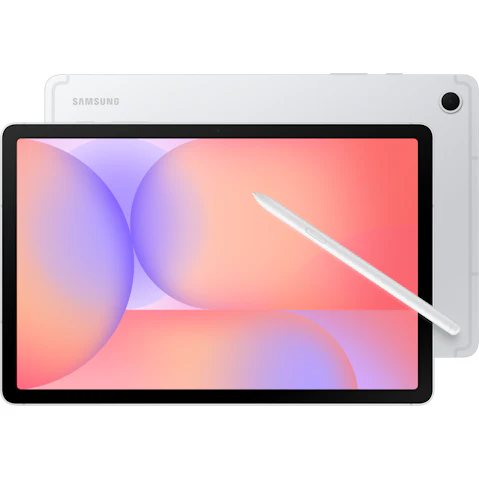
Samsung’s latest release is the Samsung Galaxy Tab S11 – alongside the Tab S11 Ultra if you want to go bigger.
Lighter, brighter and more intuitive, it’s been refined where it counts, including a redesigned S Pen that feels more natural and comfortable to grip from the moment you start writing or sketching.
You’ve got an 11‑inch AMOLED 2X display, a faster processor up to 1600 nits of brightness, so everything looks crisp – whether you’re indoors or out. With One UI 8 and built-in Galaxy AI, it feels smarter, more responsive and very capable.
Plus, with up to 18 hours of battery life, it’s not slowing down anytime soon. Work, watch, sketch, repeat.
What’s the difference between Samsung Galaxy Tab A and S?
Same name, different lane. The Samsung Galaxy Tab A and Tab S range are designed to meet you where you’re at, whether that’s casual scrolling or a more demanding workload.
Let’s take a closer look:
- Galaxy Tab S – Samsung’s best flagship tablet, flexing powerful processors, extra RAM, AMOLED displays and features like S Pen and DeX to make getting things done feel seamless (as it should be).
- Galaxy Tab A – Prefer to keep it cheap and simple? Done. Tab A covers streaming, browsing and light apps comfortably with capable processors, standard LCD displays and long battery life.
Which Samsung tablet should I buy?
Let’s get you set up with an Android tablet that actually keeps up, or one that lets you switch off properly. Either way, Samsung’s Galaxy Tab Series is doing it right.
For a laptop-like setup without the desk, the new Galaxy Tab S11 and S11 Ultra are your heavy lifters. Fast performance that doesn’t lag, multitasking that lets you bounce between apps without losing pace and S Pen support that feels natural in hand.
Then there’s Galaxy Tab A11+. Lightweight, budget-friendly and refreshingly easy to use, it’s perfect for streaming, scrolling and passing around without a second thought. Tonight’s dinner recipe open on the bench? Sorted. Life admin on the go? Covered. Kids need a screen? Hand it over.
Can Samsung tablets be used for drawing?
No sketchbook? No problem. From digital artists and illustrators to graphic designers and doodlers, Samsung Galaxy Tab is a solid choice for creatives of all kinds with stylus pen support.
Near-zero latency, pressure sensitivity and tilt detection all come together for a natural, pen-to-paper feel from the first stroke. The redesigned S Pen on the Galaxy Tab S11 Series adds a hexagonal design that’s easier to hold, a smoother tip for cleaner, more fluid lines and magnetic storage that snaps neatly into place when you’re done.
Paired with a vibrant AMOLED display and fast, responsive performance, this portable canvas is ready for whenever inspiration strikes.
Accessories at your fingertips:


